Overview
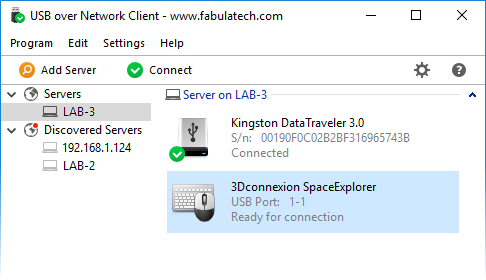
USB over Network allows to use remote USB devices shared over a local network or the Internet.
It does not matter if you are located in another office or even another country; now you can use any USB device remotely as if it were attached to your computer locally.
How it works
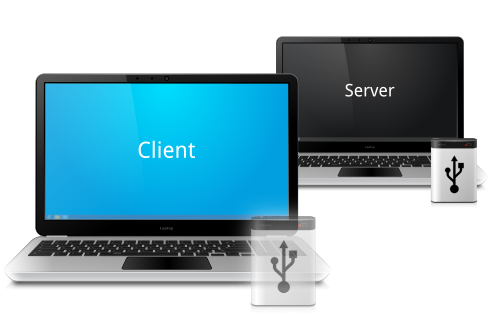
The program consists of two parts — Server and Client. The Server part is installed on a computer where USB devices are physically plugged in, making it possible to share the devices for remote connection. The Client should be installed on computers where you need to get access to remote shared USB devices.
When you connect remote USB device using a Client part on your PC, it appears as if the device was attached directly to your computer.
Real USB virtualization technology
Thanks to many years of research and development we were able to release unique USB virtualization technology. It fully emulates the USB stack of remote USB devices on the client side creating the exact virtual copy of each shared hardware USB device.
Works with any USB devices
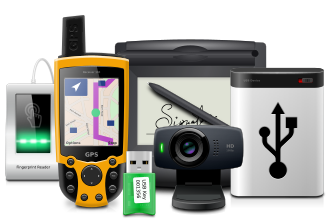
The program is not limited to some specific models of USB devices. It is compatible with any of them. So, it is really universal solution for the remote access to USB devices. Even the most exotic USB devices can be accessed over network or the Internet.
Supports all major operating systems
USB over Network supports Windows, Linux and macOS. Any Windows or Linux machine with the Client part installed can access remote USB devices shared on Windows, Linux or macOS where the Server part is installed.
Driver-free solution
USB over Network does not require USB device drivers on the Server side. This feature really simplifies everything, since it allows to share USB devices even when their drivers was not installed locally (or in case if the device is not supported by Server side OS). Keep in mind, that USB device drivers are required on the Client side anyway.
USB port sharing
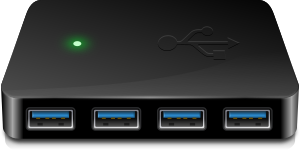
In some cases it is really convenient to use some dedicated USB port for device sharing. So any USB device being plugged into it becomes shared automatically. This won't affect other USB devices plugged into other USB ports.
All your data is secure
USB over Network transfers the data directly only between Client and Server program parts, that are installed on your computers. It doesn't connect to FabulaTech or any third-party servers. The only exception is optional checking for new versions, therefore it is fully functional even without Internet access.
Secure Sockets Layer (SSL) can be configured for establishing an encrypted link between a Server and a Client. And to protect sensitive data even more, password protection can be used for each individual USB device and the whole Server as well.
Also, we can teach customers how to forbid or allow flash drives, webcams etc. And for uncompromising security we can build a version that connect only certain class of devices, upon request.
Reversed device connections
Sometimes it’s needed to initiate device connection from Server side to Client side. So instead of connecting remote USB device, end user can “push” the local USB device to the remote computer. The call-back connection feature is especially useful in case if the Server is behind a firewall or on a NAT network.
Per-interface sharing
There is a possibility of per-interface sharing for composite devices that usually contain several USB devices. For example, if you use the webcam with built-in speaker, it’s no problem to share the webcam for remote access but leave the speakers for local use only.

Advanced sharing rules
The system of Sharing Rules allows you to fine-tune the sharing process of both, the particular device and the group of USB devices with the same properties. Built-in Sharing Rule Manager makes the rule creation process really easy.

USB server auto discovery
USB over Network Client can discover USB Servers installed in your local network. So, in most cases, it’s even not needed to specify remote IP address or hostname of the Server. Just choose the needed server from the list in order to connect the Server permanently.

OEM license available
USB over Network functionality can be easily integrated into your application. So you can share USB devices or connect them up from your application directly. Read more…

What customers say
The developmental goals of remotely operated vehicle are aimed at exploring the implementation of robotics in subsea exploration.
As part of this project, our team will be using software developed by FabulaTech for the transmission of control signal from the surface laptop. Using the server-client USB over Network program developed by FabulaTech, the surface control laptop acts as the server, while the client is the onboard RaspberryPi.

And even more…
- Command line control support.
- Works with any virtual machines.
- Mixed 32 and 64-bit environment.
- Single-user and multi-user environments support.
- Hyper-V compatible.
- Compatible with 3D mouse by 3Dconnexion.
- Other solutions.
Additional information
More details at USB over Network pageOS: Windows, Linux, macOS
Latest version: 6.3 for Linux released on 02/02/2026
Price: $