Overview

Virtual Modem is a software solution that replaces a pair of hardware modems with virtual modems. It allows two modem communications applications to interact over a local network or the Internet instead of dialing a telephone number. Forget about unreliable phone connections, busy lines, call chargers or any hardware equipment. The program is an absolute replacement of the hardware solution.
How it works

Virtual Modem fully replaces physical modems on both local and remote sides. On the local side it creates a virtual modem device that appears in the operating system as usual hardware modem. The main difference is that the virtual modem "dials" a remote IP address over LAN or the Internet instead of making real phone call to connect to a remote side.
On the remote side another Virtual Modem detects an incoming network connection and emulates an "incoming call" for listening modem application. So, applications can be connected now by virtual modem connection over TCP/IP.
Location independent

Virtual Modem can be used anywhere where the Internet or LAN connection is available. You can establish virtual modem connection anywhere in the world for free of charge.
True software solution

Virtual Modem is pure software-based solution designed to replace hardware modems. The program establishes connection between two communications applications over LAN or the Internet. Virtual Modem fully emulates a hardware modem on both computers.
Works as system service
The program makes virtual modems accessible at every system startup even prior to user's logon. Once configured, virtual modems are created automatically and you don't have to adjust anything or even login to operating system.
Usage example
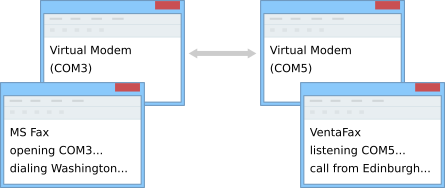
You need to send a fax message from Edinburgh to Washington DC. MS Fax is installed on a computer in Edinburgh and VentaFax is installed on a computer in Washington.
Using Virtual Modem software, virtual fax-modem device is created on both computers. MS Fax on the computer in Edinburgh "dials" the remote IP address instead of real dialing a telephone number and the remote side receives the "incoming call".
Now you can send faxes from Edinburgh to Washington DC over the Internet.

What customers say
Virtual Modem offers a simple and handy method for using the Internet instead of direct phone calls for fax software, and it can be seamlessly handled by anyone.

OEM license
The solution is available in form of one time OEM license. It means that once purchased it can be integrated into your own project and redistributed without any royalties. Read more…

And even more…
- Up to 256 virtual modems can be created.
- Virtual modems work with IP Fax Machines.
- Applications use virtual modems directly from virtual serial ports or through TAPI.
- Support of main AT commands.
- Support of main S-registers.
- User-friendly program interface. Phone book included.
- 64bit and 32bit compatible.
- Compatibility with PnP and WMI technologies.
- Works with any virtual machines.
Additional information
More details at Virtual Modem pageOS: Windows
Latest version: 2.3 released on 15 October 2025
Price: $134.95