Group Policy Object (GPO) template
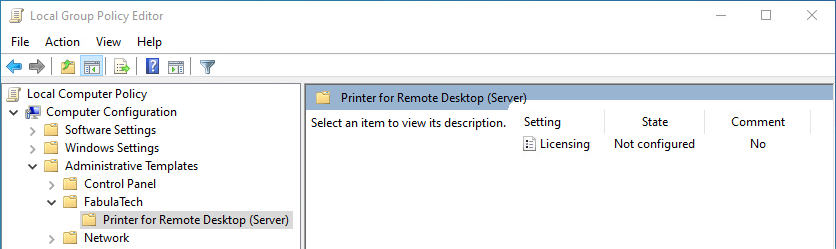
Printer for Remote Desktop Server includes *.admx and *.adml administrative template files. These template files allow to configure the product via Local GPO and/or Domain-Based GPO. Please refer to Microsoft MSDN article on managing ADMX files.
The archive file containing administrative template can be found in the installation directory:
%ProgramFiles%\FabulaTech\Printer for Remote Desktop (Server)\policies.zip
Additionally, the administrative template files are deployed to a local GPO during product installation and can be found here:
%WINDIR%\PolicyDefinitions\Fabulatech.admx
%WINDIR%\PolicyDefinitions\ftprintrdpsrv.admx
%WINDIR%\PolicyDefinitions\en-US\Fabulatech.adml
%WINDIR%\PolicyDefinitions\en-US\ftprintrdp.adml
It's recommended to use the GPO template files provided with the latest product version of Printer for Remote Desktop Server.
Some GPO policies can be set in different locations, depending on their target (Computer Configuration, User Configuration), or their level of applicability (FabulaTech, Product). If a policy is configured in multiple locations, the following priority order applies (from highest to lowest):
- Computer Configuration -> Administrative Templates -> FabulaTech
- User Configuration -> Administrative Templates -> FabulaTech
- Computer Configuration -> Administrative Templates -> FabulaTech -> Printer for Remote Desktop (Server)
- User Configuration -> Administrative Templates -> FabulaTech -> Printer for Remote Desktop (Server)
- Product settings (GUI, registry, etc.)
Policies defined at a higher level override those set at lower levels.
The GPO template can be used to configure the following settings:
| Setting | Target | Level | Description |
|---|---|---|---|
| Custom resolutions | Computer, User | Product |
This policy setting is used to add custom print resolutions (DPI) to the printer's resolution list (in case if the printer does not support such values) making it possible to print using reduced resolution. It may help speed up image processing and network transfer at the cost of reduced quality. Unlike the "Limit quality for large prints", this policy setting allows the user to flexibly adjust the desired DPI. The image will be printed using the closest higher supported resolution of the printer.
|
| Default printer assignment mode | Computer, User | Product |
This policy setting defines how the default printer is assigned each time a user logs in to a remote session.
If this policy setting is disabled or not configured, Printer for Remote Desktop uses "Default printer on workstation" mode. |
| Disable duplex | User | Product |
This policy setting controls whether duplex (double-sided) printing is available for printers that support duplex printing. If this policy setting is enabled, the duplex (double-sided) printing option is not available in the printing application or printer driver settings. As a result, all print jobs are printed single-sided. If this policy setting is disabled or not configured, the duplex printing is controlled by the application and printer driver settings. |
| Filter printers | User | Product |
|
| Licensing | Computer | FabulaTech, Product |
This policy setting configures the licensing method used by the product. The following licensing modes are available:
When License Key is selected, specify the appropriate license key in the corresponding field. When License Server is selected, specify the license server address in the following format: server[:port] where server is the host name or IP address of the license server. The port is optional. If omitted, the default license server port is 33033. If this policy setting is enabled, the licensing mode and related settings defined by this policy override any configuration made through the product's settings interface. If this policy setting is disabled or not configured, the product uses the licensing configuration specified through the settings interface. Note: This policy setting can be configured at both the FabulaTech level and the product level. If this policy setting is applied at the FabulaTech level, it overrides the same policy setting applied at the product level for all installed FabulaTech products. |
| Limit quality for large prints | Computer, User | Product |
This policy setting is used to reduce print quality when the printed page area is larger than specified. It may help speed up the printing of large-format documents while maintaining maximum quality for smaller pages.
|
| Log file rotation | Computer | Product |
This policy setting controls advanced log file rotation behavior. The product may create multiple logs for each user, depending on factors such as Session ID, Process ID (PID), and FabulaTech product module. Each log is stored on disk as a set of log file parts, which are created as the log is rotated. When the active log file part reaches the configured size limit, it is rotated: the current file part is renamed, and a new empty file part is created for the same log. If any of the configured limits are exceeded, the oldest log file parts are automatically removed according to the configured rules.
If this policy is disabled or not configured, log file rotation behavior is controlled by the application’s internal log rotation settings. |
| Log level | Computer | Product |
If this policy is disabled or not configured, the log level is controlled by the application’s internal logging settings. |
| Printer isolation mode | Computer, User | Product |
This policy setting defines how printers are visible and accessible across user sessions.
If this policy setting is disabled or not configured, the Strict isolation mode is applied. |
| Printer name template | Computer, User | Product |
Specifies the format of the virtual printer names. Available options:
|
| Turn off "Check for updates" | Computer | FabulaTech, Product |
This policy setting determines whether the application is allowed to check for updates and notify the logged-on user.
Enabled:
Disabled:
Not Configured: Note: If this policy setting is applied at the FabulaTech level, it overrides the same policy setting applied at the product level for all installed FabulaTech products. |