Group Policy Object (GPO) template
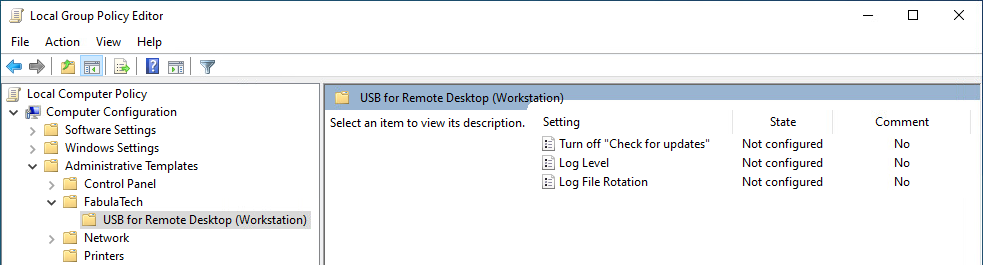
USB for Remote Desktop Workstation includes *.admx and *.adml administrative template files. These template files allow to configure the product via Local GPO and/or Domain-Based GPO. Please refer to Microsoft MSDN article on managing ADMX files.
The archive file containing administrative template can be found in the installation directory:
%ProgramFiles%\FabulaTech\USB for Remote Desktop (Workstation)\policies.zip
Additionally, the administrative template files are deployed to a local GPO during product installation and can be found here:
%WINDIR%\PolicyDefinitions\Fabulatech.admx
%WINDIR%\PolicyDefinitions\ftusbrdpwks.admx
%WINDIR%\PolicyDefinitions\en-US\Fabulatech.adml
%WINDIR%\PolicyDefinitions\en-US\ftusbrdpwks.adml
It's recommended to use the GPO template files provided with the latest product version of USB for Remote Desktop Workstation.
Some GPO policies can be set in different locations, depending on their target (Computer Configuration, User Configuration), or their level of applicability (FabulaTech, Product). If a policy is configured in multiple locations, the following priority order applies (from highest to lowest):
- Computer Configuration -> Administrative Templates -> FabulaTech
- User Configuration -> Administrative Templates -> FabulaTech
- Computer Configuration -> Administrative Templates -> FabulaTech -> USB for Remote Desktop (Workstation)
- User Configuration -> Administrative Templates -> FabulaTech -> USB for Remote Desktop (Workstation)
- Product settings (GUI, registry, etc.)
Policies defined at a higher level override those set at lower levels.
The GPO template can be used to configure the following settings:
| Setting | Target | Level | Description |
|---|---|---|---|
| Log file rotation | Computer | Product |
This policy setting controls advanced log file rotation behavior. The product may create multiple logs for each user, depending on factors such as Session ID, Process ID (PID), and FabulaTech product module. Each log is stored on disk as a set of log file parts, which are created as the log is rotated. When the active log file part reaches the configured size limit, it is rotated: the current file part is renamed, and a new empty file part is created for the same log. If any of the configured limits are exceeded, the oldest log file parts are automatically removed according to the configured rules.
If this policy is disabled or not configured, log file rotation behavior is controlled by the application’s internal log rotation settings. |
| Log level | Computer | Product |
If this policy is disabled or not configured, the log level is controlled by the application’s internal logging settings. |
| Turn off "Check for updates" | Computer | FabulaTech, Product |
This policy setting determines whether the application is allowed to check for updates and notify the logged-on user.
Enabled:
Disabled:
Not Configured: Note: If this policy setting is applied at the FabulaTech level, it overrides the same policy setting applied at the product level for all installed FabulaTech products. |