Sharing the Same Physical COM Port Among Several Applications
Serial Port Splitter allows you to share a physical COM port among several applications. After COM port is shared it can be opened by those applications simultaneously.
1.
On the toolbar, click  button.
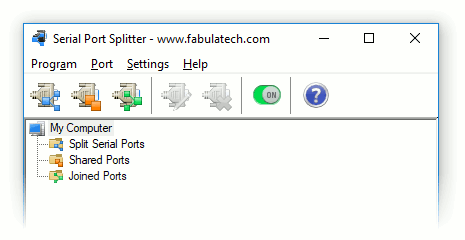
2. Select physical COM port you want to share.
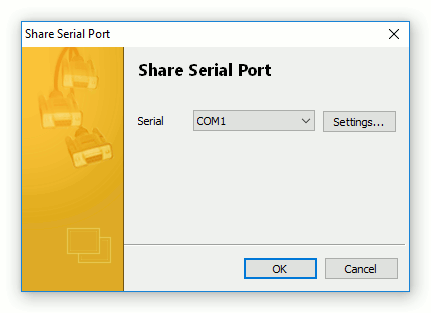
4. Click .
Now, several applications can open shared COM port and work with it simultaneously.
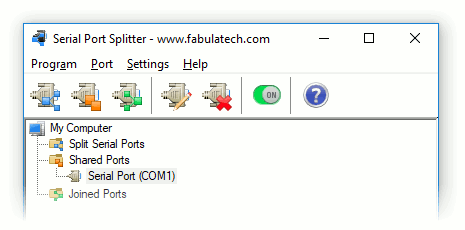
This feature is just like split feature, however additional virtual COM ports are not created here.
To avoid conflict situations, Serial Port Splitter allows application that opened shared COM port before others to manage COM port signals and settings.
Shared Port Settings
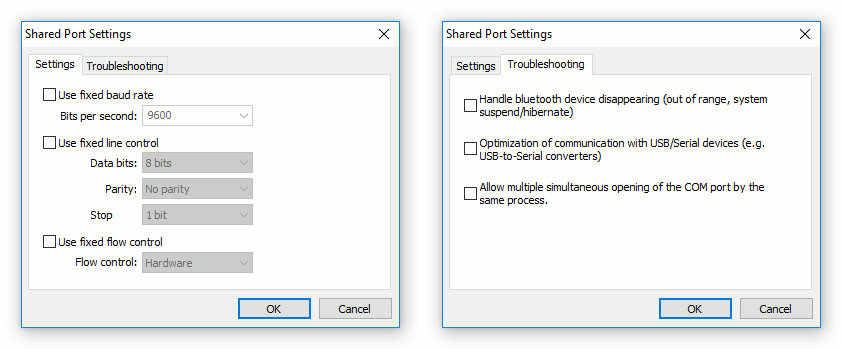
Click to setup settings for shared COM port.
Fixed COM Port Settings
Sometimes different applications can open COM ports with different settings (e.g. bits per second or data bits). It can lead to incorrect working of the whole system. In such cases you can use fixed settings of COM port.
Troubleshooting
This section allows configuring the behaviour of a specific serial port for non-standard cases.
- Handle bluetooth device disappearing (out of range, system suspend/hibernate)
- For a shared serial port of a bluetooth device there is always a risk of the port disappearance when the device gets out of range. Enabling this option is recommended in case of splitting bluetooth serial ports.
- Optimization of communication with USB/Serial devices (e.g. USB-to-Serial converters)
- For a shared serial port of a USB-to-COM bridge device there is a risk of incorrect behavior in some cases. Enable the function, if the port stops transmitting data, the port does not open/close, etc.
- Allow multiple simultaneous opening of the COM port by the same process
- Some applications may try to do multiple openings of the COM port simultaneously. Naturally, if the application works with the physical COM port directly, only the first opening succeeds. Anyway, if multiple simultaneous openings of the virtual COM port by the same application are needed, enable this option.